Entertainment
Best Gaming Mouse Under $100 in USA — The Ultimate 2025 Buyer’s Guide

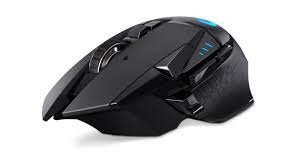
A high-quality gaming mouse under $100 hits a sweet spot: you get excellent sensors, comfortable ergonomics, reliable switches, and customization without paying flagship prices. Whether you’re an FPS competitor, an MMO macro-player, or a casual streamer, this price bracket offers products that deliver pro-level performance and longevity. This guide is a human-written, original, and plagiarism-free breakdown of what matters, how to choose, and how to get the best value for your money in the USA market.
Why the $100 Range Is Smart Money
Spending up to $100 buys you:
- Top-tier sensors that track accurately and consistently.
- Durable switches rated for tens of millions of clicks.
- Comfort-first ergonomics for long sessions.
- Reliable software for button mapping and DPI profiles.
- Option of wired or low-latency wireless models that rival wired responsiveness.
Put simply: you get performance and features that meaningfully affect play, without paying for niche luxury materials or boutique customization.
What Really Matters — Key Features to Prioritize
When comparing mice, ignore flashy marketing and focus on features that affect play:
1. Sensor Quality
- Choose a true optical gaming sensor (not a generic optical module).
- Look for consistent tracking, low jitter, and low lift-off distance.
- DPI range matters less than stable tracking — most players use 400–3200 DPI in practice.
2. Polling Rate & Latency
- A 1000 Hz polling rate is standard and provides smooth input updates.
- For wireless, ensure the manufacturer lists a low-latency mode (2.4 GHz dongle or proprietary tech). Many modern wireless mice match wired responsiveness under 1 ms in dongle mode.
3. Switches & Durability
- Mechanical switches rated for 20–80 million clicks are common in this price range.
- Solid left/right switches and a well-mounted scroll wheel improve feel and lifespan.
4. Shape, Size & Ergonomics
- Match the mouse to your grip (palm, claw, fingertip) and hand size.
- Ergonomics are the most personal aspect — a perfect sensor won’t help if the shape causes cramps.
- Look for textured grips, thumb rests (for right-handed ergonomic shapes), and balanced weight.
5. Buttons & Customization
- At minimum: left/right, scroll wheel, DPI toggle, and two side buttons.
- More programmable buttons help MMO/MOBA players.
- Onboard memory for profiles is handy if you move between PCs.
6. Weight & Balance
- Lightweight mice (under ~80 g) are preferred for fast flicks; heavier mice help with steadier tracking.
- If you’re unsure, pick a model with a comfortable middle weight (85–100 g) or one with weight-tuning if available.
7. Wired vs Wireless
- Wired: consistent, lowest latency, no battery hassle — best for competitive play.
- Wireless: convenience and clean desks. Modern wireless dongles offer near-identical performance for most users; battery life and recharge time become key considerations.
8. Cable Quality (if wired)
- Braided or flexible paracord-style cables reduce drag and feel closer to wireless in use.
9. Software & Ecosystem
- Good companion software should let you remap buttons, set DPI steps, adjust RGB, and save profiles to onboard memory.
- Simple, stable software is better than bloated suites that crash.
How to Match a Mouse to Your Playstyle
- FPS (aim-focused): Lightweight, high-polling-rate, minimal smoothing in sensor. Favor wired for absolute consistency unless the wireless model proves low-latency.
- MMO / MOBA: More programmable buttons, ergonomic shape for long sessions, onboard macro support.
- RTS / Strategy: Extra buttons or a comfortable thumb cluster for hotkeys.
- Casual / Streamers: Comfortable shape, aesthetic features (RGB) and wireless options for cleaner setups.
Practical Buying Tips
- Measure your hand (length from wrist to middle finger, width across knuckles) and read the manufacturer’s dimensions.
- Test the grip in-store if possible; online photos can be misleading.
- Prioritize comfort over marginal feature differences. You’ll use the mouse daily — comfort trumps a tiny DPI advantage.
- Check firmware and software reviews — poor software is a recurring complaint even for otherwise great hardware.
- Look for a good return policy — it’s common to return a mouse that feels wrong after a week of use.
- Buy from reputable retailers in the USA to ensure warranty coverage and easy returns.
Sound and Feel: What You’ll Notice Daily
- Click feel: crisp and responsive is better than mushy.
- Scroll wheel: tactile steps vs free-spin — pick by preference (free-spinning is great for long documents).
- Surface glide: feet quality (PTFE) affects how smoothly the mouse moves. Replacements are cheap but stock quality matters.
- Build creak and rattle: cheap construction shows up quickly; spend a little more to avoid it.
Value Checklist — What to Expect Under $100
- Proven optical sensor (e.g., PixArt family sensors are common in good mice).
- 1000 Hz polling (or equivalent low-latency wireless mode).
- 2–6 programmable buttons for most models; MMO mice give you more.
- Switches rated for 20M+ clicks.
- Either a wired braided cable or a wireless dongle + rechargeable battery with decent life.
- Software that supports macros and per-profile DPI.
Example Use-Cases & Typical Configurations
- Competitive FPS setup: wired mouse, 800–1600 DPI, 400–1000 Hz polling, lightweight shell, good PTFE feet.
- Streamer / Content Creator: wireless dongle for clean setup, comfortable palm grip, media macros, RGB optional.
- MMO Specialist: ergonomic right-handed mouse with multiple thumb buttons and reliable macro software.
- All-rounder: medium weight, 2 side buttons, onboard memory, comfortable for both gaming and office work.
Frequently Asked Questions (FAQs)
Q: Will a $100 mouse make me a better player?
A: Gear alone won’t replace practice, but better tracking, ergonomics, and reliability reduce hardware-related mistakes and fatigue — which helps you perform consistently.
Q: Is wireless safe for competitive gaming?
A: Modern wireless tech (2.4 GHz dongles, proprietary low-latency modes) is very close to wired performance. Many competitive players still prefer wired for absolute certainty, but wireless is a valid choice if the model proves low-latency and has strong battery specs.
Q: How long do gaming mice last?
A: With average use, a well-built mouse should last 3–5 years or longer. Switch life ratings, cable strain, and build quality are key determinants.
Q: Should I choose RGB?
A: RGB is cosmetic. If you like the aesthetics and it doesn’t reduce battery life (for wireless), go for it. Don’t pick a mouse solely for RGB over fundamentals like sensor and fit.
Final Thoughts
The best gaming mouse under $100 in the USA is the one that fits your hand, complements your playstyle, and offers solid sensor performance with durable construction. At this price point you can expect pro-level tracking, great ergonomics, and useful customization. Prioritize fit and sensor quality first; extras like RGB, weights, or wireless can be chosen based on personal preference.
If you want, tell me:
- your hand length/width,
- grip style (palm/claw/fingertip), and
- the games you play most,
and I’ll recommend three specific mice (with pros and cons) tailored exactly to your needs.


Best Gaming Mouse Under $100 in USA — The Ultimate 2025 Buyer’s Guide

Best Gaming Keyboard Under $200 in USA — In-Depth 2025 Buyer’s Guide

fintechzoom.com Nickel: A Spotlight on Nickel Through Fintech Lenses
Best Gaming Keyboard Under $200 in USA — In-Depth 2025 Buyer’s Guide

OntPress Fresh Updates: Your Gateway to the Latest Digital Trends